My Theme does not support App Block
1. Enable the 'SmartSize Script' App Embed
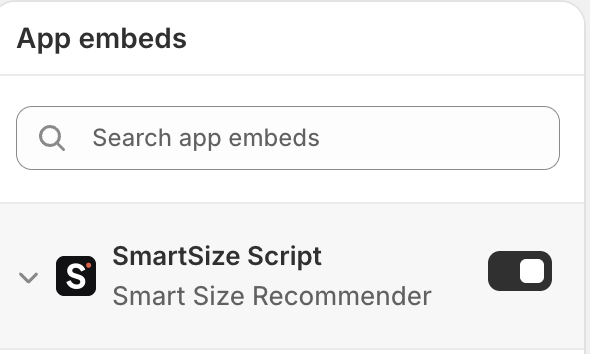
2. Add the button's code snippet to your theme
On the .liquid file where you want to display the button (usually variant-picker.liquid or product-options.liquid), locate the position where you want the button added and insert the following code snippet:
{% comment %}
  START SMARTSIZE RECOMMENDER
{% endcomment %}

<style>
#smartrecom-button.smartrecom-main-button {
display: none;
    }
#smartrecom-button.smartrecom-main-button.visible {
display: inline-flex;
    }
</style>
<div id="smartrecom-inline-button"
style="display: flex;"
data-smartrecom-shop="#{{ shop.permanent_domain }}"
data-smartrecom-product-image="https:#{{ product | image_url: width: 1000 }}"
data-smartrecom-product-title="#{{ product.title }}"
data-smartrecom-product-id="#{{ product.id }}"
data-smartrecom-collection-ids="#{{ product.collections | map: 'id' | join: ',' }}"
data-smartrecom-tags="#{{ product.tags | join: ',' }}"
data-smartrecom-type="#{{ product.type }}"
data-smartrecom-vendor="#{{ product.vendor }}"
data-smartrecom-localization-language="#{{ localization.language.iso_code }}"
data-smartrecom-localization-country="#{{ localization.country.iso_code }}"
>
<button id="smartrecom-button"
class="smartrecom-main-button"
type="button"
style="background: #CAAF88;
color: #ffffff;
padding: 6px 14px 8px; border: none;
margin-bottom: 10px">
<span id="smartrecom-button-text">Find my size</span>
</button>
</div>

{% comment %}
  END SMARTSIZE RECOMMENDER
{% endcomment %}
3. Styling the button
Feel free to change any of the styles on <button> , under the style property:
| Property | What it styles | Sample values |
| background | Button's color | black #CAAF8 |
| color | Button's text color | white #ffffff |
| padding | "Size" of the button, i.e. space around the text label | |
| border | Button's border color and style | 8px none |
| margin-bottom | Space below the button, between the button and the next component | 10px none |